
Every prescriber who sends electronic prescriptions for controlled substances (EPCS) through Amazing Charts needs an active EPCS subscription. Subscriptions renew annually, and a lapsed subscription pauses a prescriber’s ability to e-prescribe controlled substances until it’s renewed. This article walks you through renewing a subscription from start to finish. It takes about five minutes.
- Time to complete: ~5 minutes
- Cost: $250 per prescriber, per year
- Renewal frequency: Annual
Why this matters
EPCS (Electronic Prescribing of Controlled Substances) lets prescribers send controlled-substance prescriptions electronically instead of on paper. DEA regulations require every prescriber to complete identity-proofing and keep their EPCS subscription current, renewed every year. If a subscription lapses, that prescriber’s ability to e-prescribe controlled substances is paused until it’s renewed. Staying on top of renewal keeps your practice compliant and avoids any interruption to patient care.
Before you begin
- Practice administrator access to Amazing Charts
- The name(s) of the prescriber(s) whose EPCS subscription needs renewing
- A valid credit card for payment ($250 per prescriber, billed annually)
- About 5 minutes
Part 1: Open the ePrescribing admin screen
- Log into Amazing Charts. Sign in with your usual practice credentials.
- Open a patient’s chart. Any chart works, including a test patient. You’re just navigating to the e-prescribing tools, no real prescription is created.
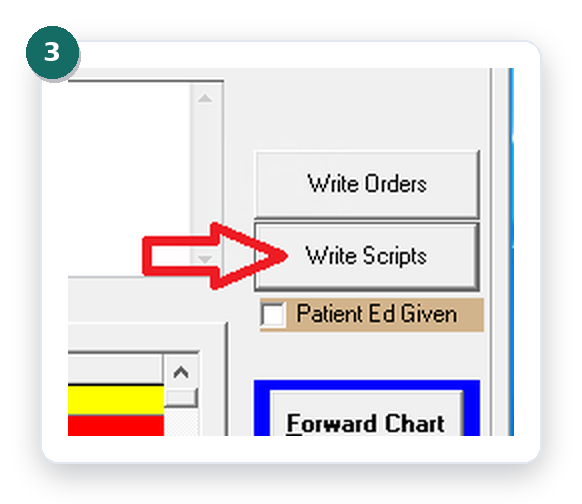
- Click Write Scripts. This opens the prescribing workspace for the chart.
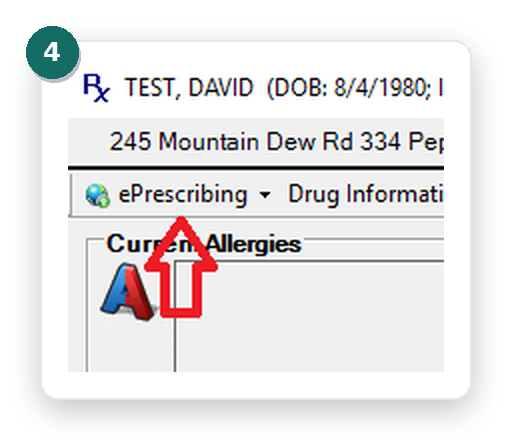
- Click ePrescribing. You’ll find it in the top left of the Write Scripts screen.
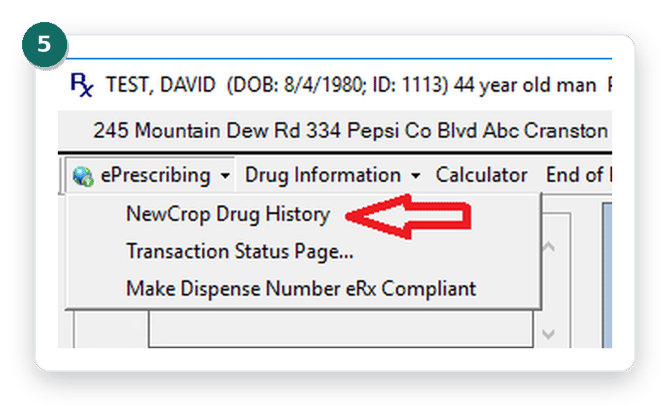
- Click NewCrop Drug History. This opens the connection to NewCrop, the service that manages EPCS subscriptions.
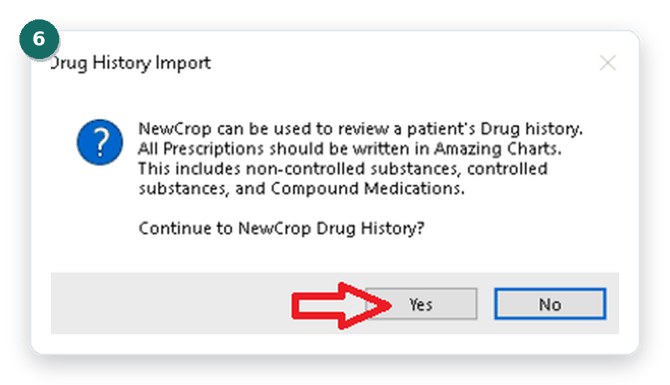
- Click Yes. Confirm to continue to NewCrop Drug History.
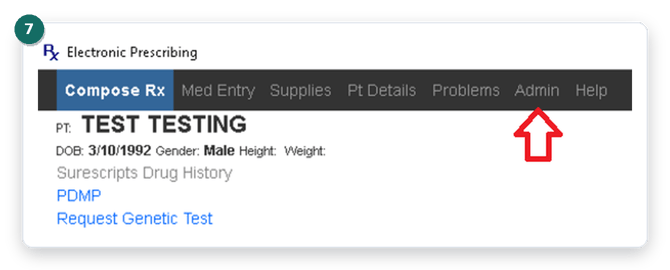
- Click Admin. In the Electronic Prescribing toolbar at the top of the screen.
Part 2: Find and select the subscription
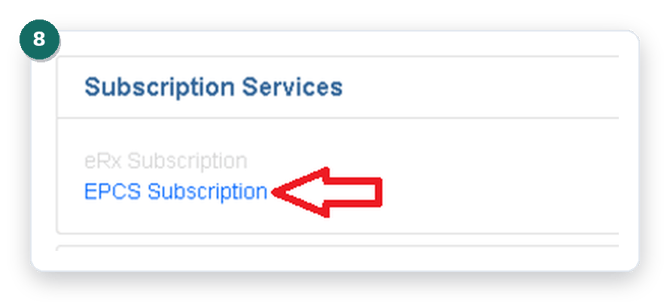
- Click EPCS Subscription. You’ll find this under Subscription Services.
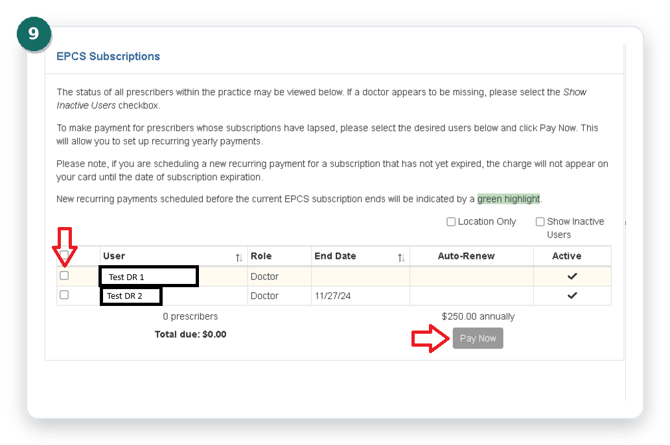
- Select the prescriber and click Pay Now. Check the box to the left of the prescriber’s name, then click Pay Now.
Don’t see the prescriber you’re looking for? Check the Show Inactive Users box in the top right to reveal them.
Part 3: Complete payment
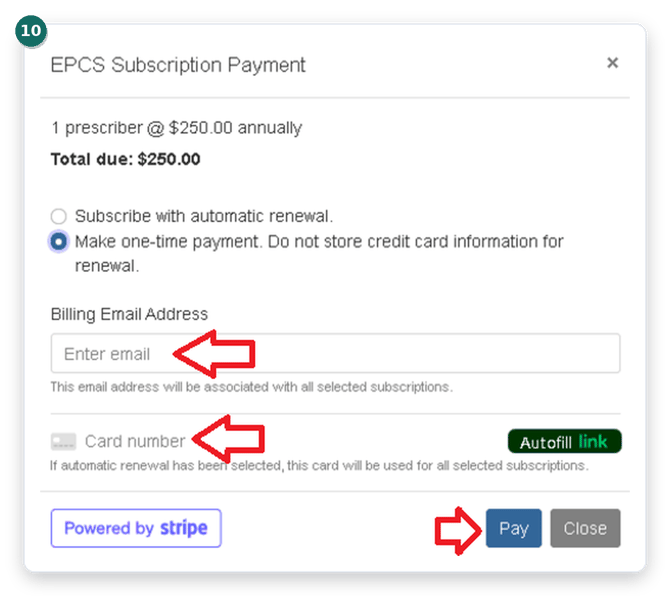
- Choose Make one-time payment. Select this option to pay for this renewal only.
Prefer not to repeat this every year? Choose Subscribe with automatic renewal instead. See the FAQ below for details.
- Enter the billing email address. Your payment receipt will be sent to this address.
- Enter the credit card details. Card number, expiration date, and CVV.
- Click Pay. That’s it, the subscription is renewed and the prescriber can continue e-prescribing controlled substances without interruption.
Frequently asked questions
What if I don't see a prescriber listed on the EPCS Subscriptions screen?
Check the Show Inactive Users box near the top right of the screen. This reveals prescribers who aren’t currently active.
Can I avoid doing this every year?
Yes. On the payment screen, choose Subscribe with automatic renewal instead of Make one-time payment. The card on file will be charged automatically each year, no manual renewal needed.
If I renew early, when will my card actually be charged?
If you schedule a new recurring payment before the current subscription expires, your card won’t be charged until the actual expiration date. Renewals scheduled this way show with a green highlight on the EPCS Subscriptions screen, so you can confirm it’s queued up correctly.
How much does an EPCS subscription cost?
$250 per prescriber, billed annually.
What happens if a subscription lapses?
The prescriber will not be able to submit electronic prescriptions for controlled substances until the subscription is renewed. Non-controlled prescriptions are not affected.
Still need help?
If you run into any trouble renewing an EPCS subscription, reach out to Amazing Charts Support at 866-382-5932 option 1 or support@amazingcharts.com.