
Highlighted Enhancements
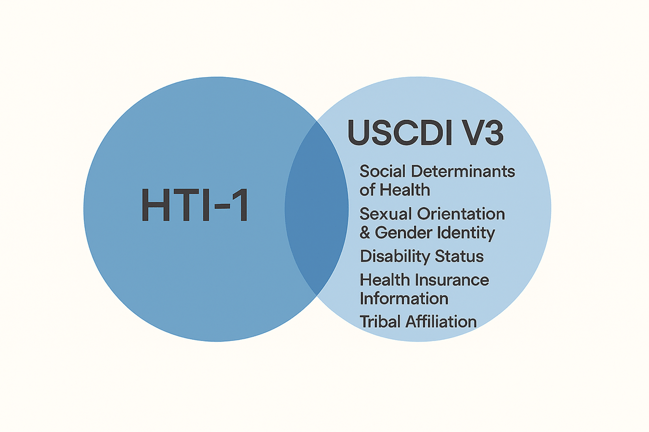
HTI‑1 refers to the Health Data, Technology, and Interoperability: Certification Program Updates, Algorithm Transparency, and Information Sharing rule published by the Assistant Secretary for Technology Policy (ASTP). It’s a major regulatory update that impacts certified EHR technology and health IT developers.
USCDI V3 stands for the United States Core Data for Interoperability Version 3, which is a standardized set of health data classes and elements that must be supported for interoperability. It expands on previous versions by adding new data elements such as:
- Social Determinants of Health (SDOH) (e.g., assessments, goals, health concerns, interventions)
- Sexual Orientation and Gender Identity (SOGI)
- Disability Status
- Health Insurance Information
- Tribal Affiliation
- Functional and Mental Status
- Pregnancy Status
SQL Server 2016 will reach its end of extended support on July 14, 2026. After that date, no security updates or fixes will be provided, which can pose compliance and security risks.
Risks of continuing past EOL:
- Security vulnerabilities: Unpatched systems become easier targets for cyberattacks.
- Compliance exposure: Unsupported software may violate regulations such as HIPAA or GDPR.
- Compatibility issues: Newer applications and frameworks may no longer support the old database version.
Interoperability Enhancements: Comprehensive updates to CCDA documents, FHIR transmissions, and EHI exports, enabling standardized exchange of expanded data sets such as SDOH assessments, goals, health concerns, procedures, health service requests, and additional demographic and clinical details.
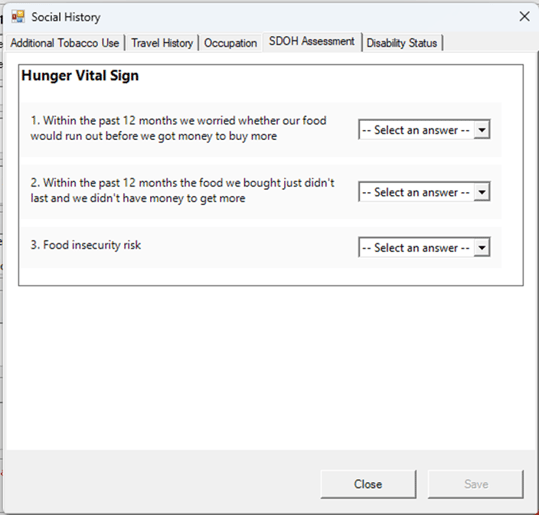
Document SDOH Assessment
Workflow Steps:
- Navigate to Social History in the Most Recent Encounter.
- Click the MIPS Icon.
- Click the SDOH Assessment Tab to access the Hunger Vital Sign Assessment.
Purpose:
This enhancement supports USCDI V3 compliance by enabling clinicians to document SDOH-related assessments in a structured way for interoperability and regulatory requirements.
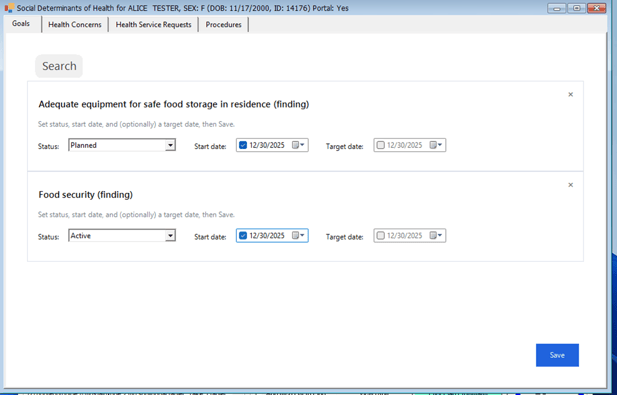
Document SDOH Goals
Workflow Steps:
- Navigate to the Most Recent Encounter.
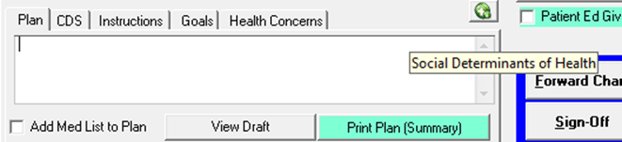
- Click the SDOH Icon.
- Click the Search button.
- Enter text in the search text box or select one or more items that are displayed.
- Click Next.
- Select a status and a start or target date.
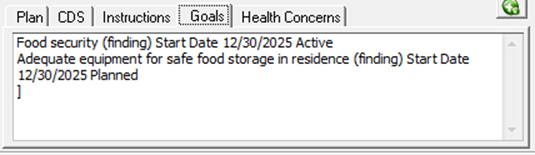
- Click Save, and the goals will be added to the Goals tab in the Plan.
Purpose:
This enhancement supports USCDI V3 compliance by enabling clinicians to document SDOH-related goals in a structured way for interoperability and regulatory requirements.
Document SDOH Health Concerns
Workflow Steps:
- Navigate to the Most Recent Encounter.
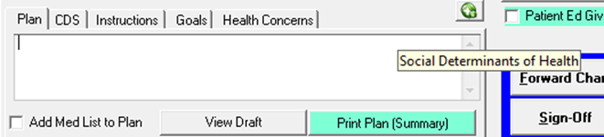
- Click the SDOH Icon.
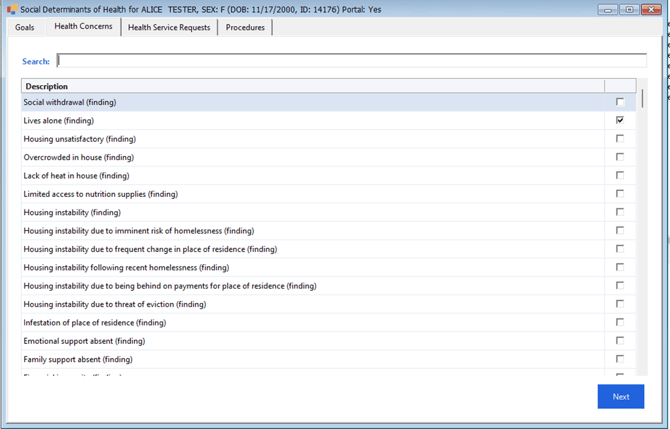
- Click the Search button.
- Enter text in the search text box or select one or more items that are displayed.
- Click Next.
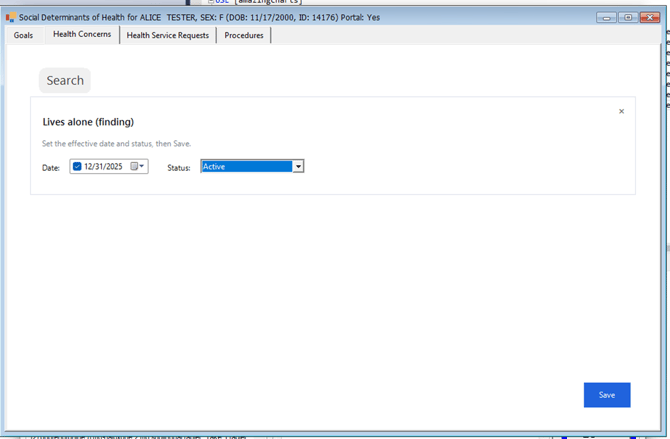
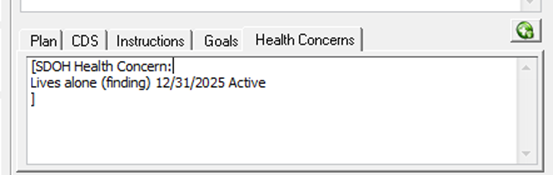
- Enter Date and Status, then click Save.
- The Health Concern is added to the Health Concern Tab in the Plan.
Purpose:
This enhancement supports USCDI V3 compliance by enabling clinicians to document SDOH-related health concerns in a structured way for interoperability and regulatory requirements.
Document SDOH Health Service Requests
Workflow Steps:
- Navigate to the Most Recent Encounter.
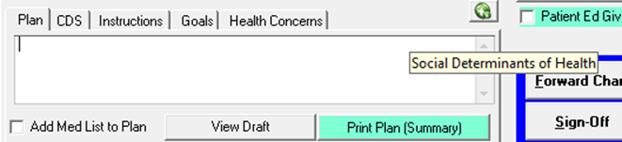
- Click the SDOH Icon.
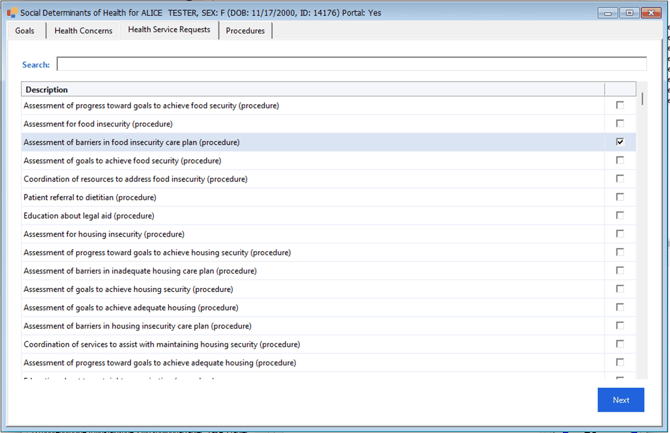
- Click the Search button.
- Enter text in the search box or select one or more items displayed.
- Click Next.
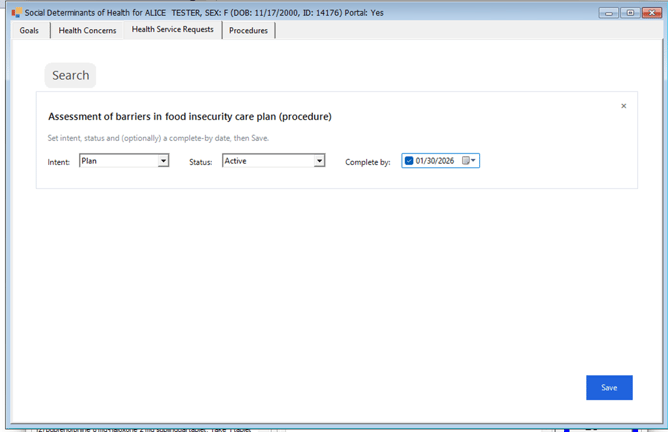
- Complete Intent, Status, and Date, then click Save to update the Plan.
Purpose:
This enhancement supports USCDI V3 compliance by enabling clinicians to document SDOH-related health service requests in a structured way for interoperability and regulatory requirements.
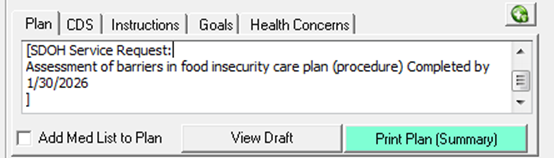
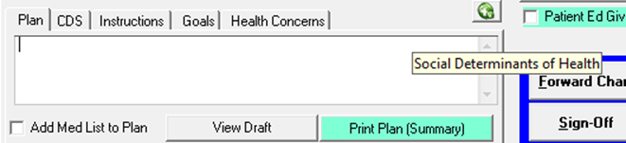
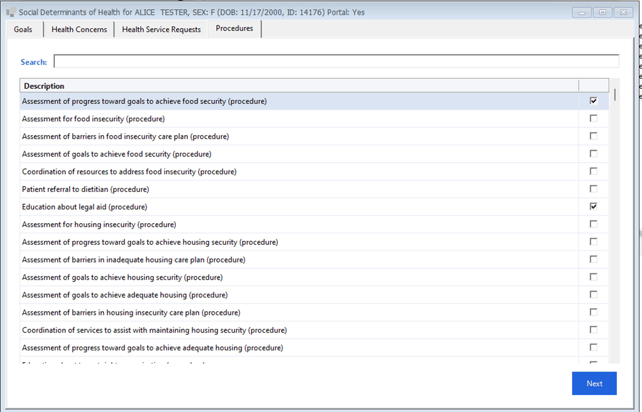
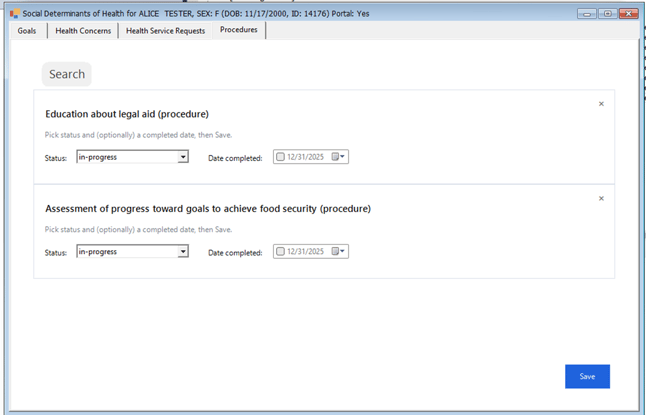
Document SDOH Procedures
Workflow Steps:
- Navigate to the Most Recent Encounter.
- Click the SDOH Icon.
- Click the Search button.
- Enter text in the search box or select one or more items displayed.
- Click Next.
- Confirm Status and Date Completed, then click Save to update the Plan.
Purpose:
This enhancement supports USCDI V3 compliance by enabling clinicians to document SDOH-related procedures (interventions) in a structured way for interoperability and regulatory requirements.
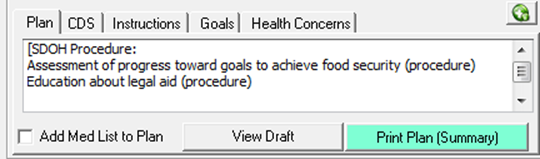
Add LOINC Codes to Diagnostic Orders
Clinicians now have the ability to add LOINC codes to diagnostic test orders.
- Facilitates interoperability by standardizing diagnostic test identification across systems.
- Supports compliance with USCDI V3 and other regulatory requirements for structured data exchange.
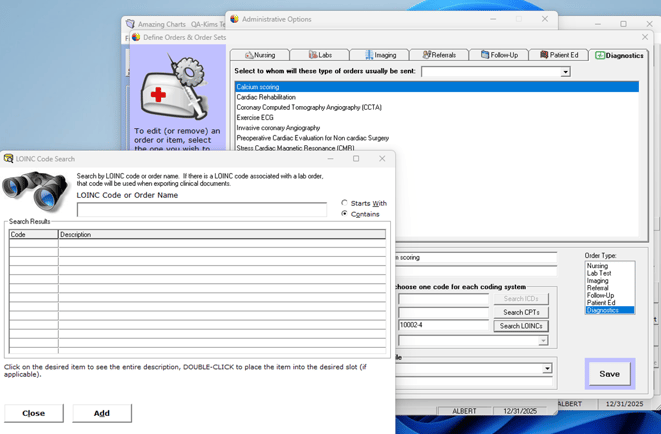
Enlarge Text Box - Move Functional Status and Confidential Sections
The Functional Status and Confidential sections have been repositioned in the encounter layout.
These sections now appear below Goals and Health Concerns for better workflow alignment and usability.
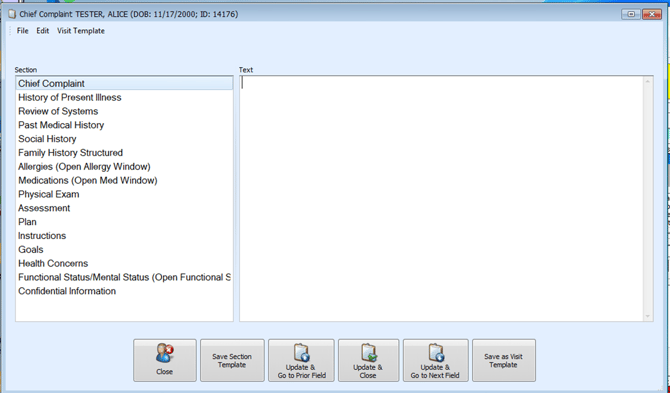
Document Disability Status
Workflow:
Navigate to the Most Recent Encounter.
In the Social History section, a new Disability Status tab is available for clinicians to document this information.
Purpose:
This enhancement ensures compliance with USCDI V3, which requires capturing Disability Status for interoperability and regulatory requirements.
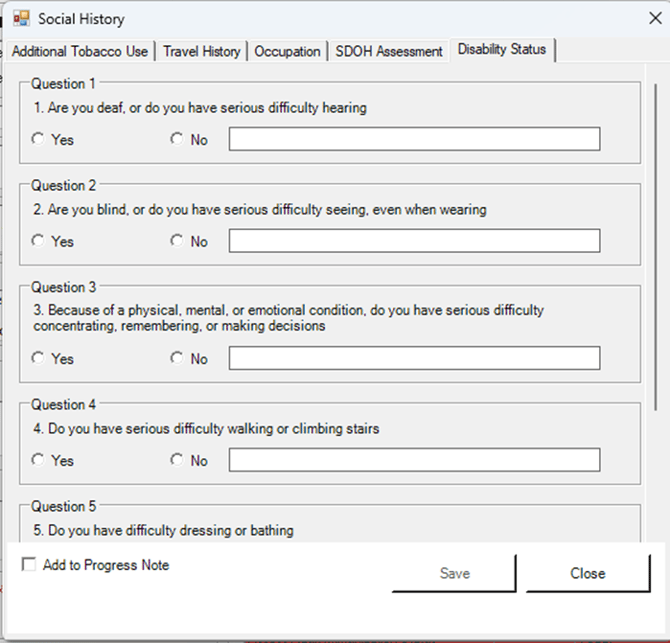
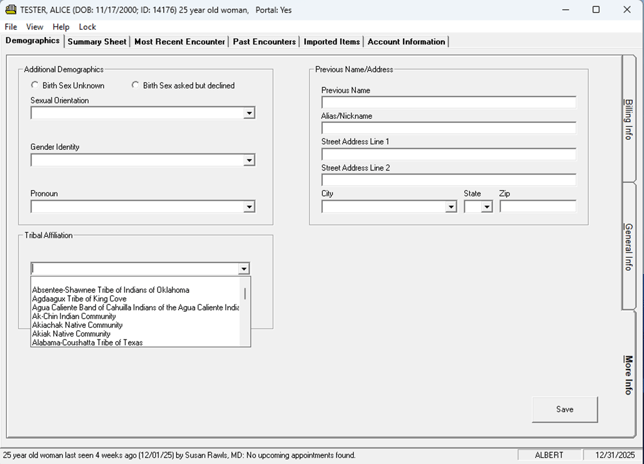
Document Tribal Affiliation
Navigate to Patient Demographics → More Info Tab.
A new Tribal Affiliation option is available for clinicians to record this information.
This enhancement supports USCDI V3 requirements, ensuring Tribal Affiliation is captured for interoperability and regulatory compliance.
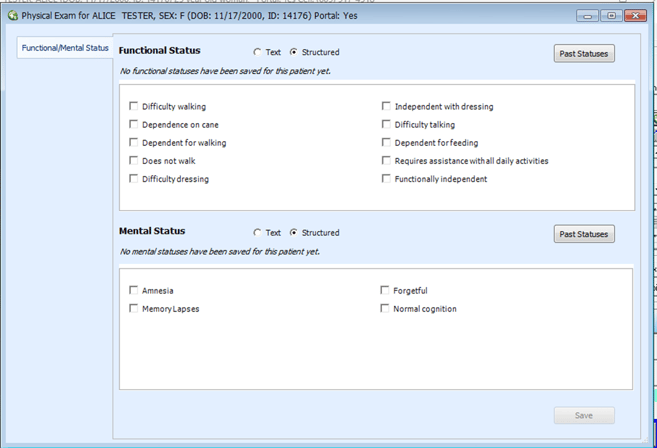
Document Structured Functional and Mental Status
Clinicians can now document Functional and Mental Status using either structured data (standardized fields for interoperability) or free text (for narrative flexibility).
This enhancement supports USCDI V3 compliance, ensuring that these data elements are captured for interoperability and regulatory requirements.
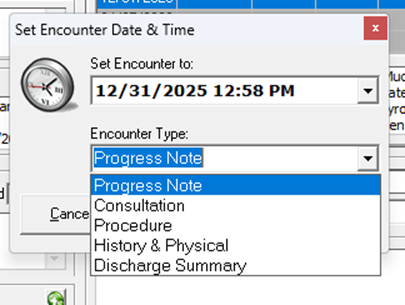
Add Encounter Type Discharge Summary
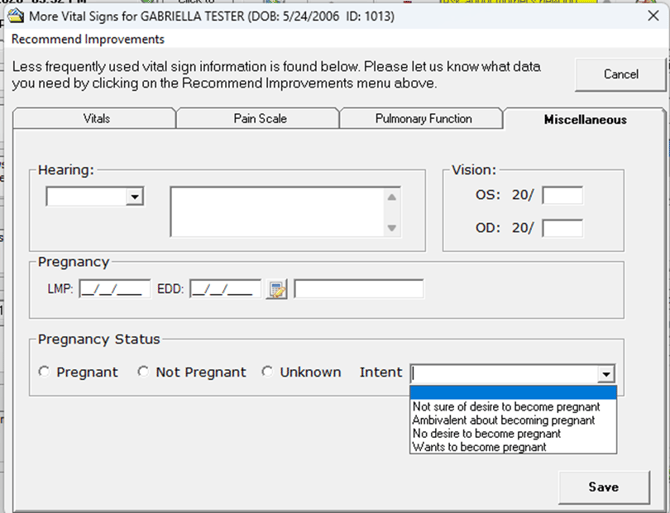
Document Pregnancy Status
The user preference “Vitals Display LMP/EDD” (Last Menstrual Period / Estimated Due Date) must be turned on in the system settings.
When this preference is active, the workflow allows clinicians to document pregnancy status during an encounter. This is part of the broader enhancements related to USCDI V3 compliance, which includes capturing additional health data elements like pregnancy status for interoperability and regulatory requirements.
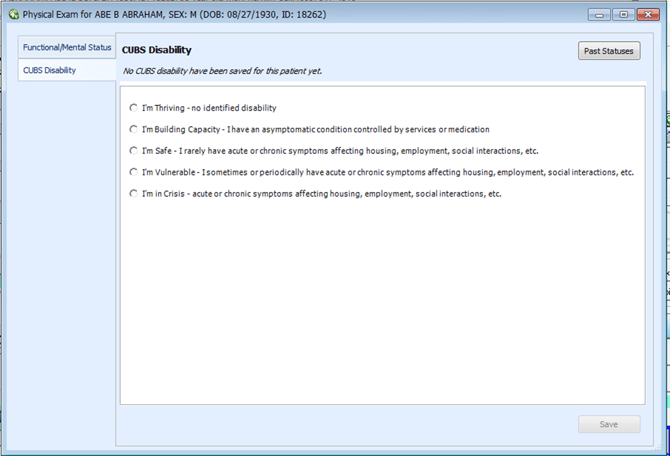
CUBS Disability UI
Workflow Steps
- Navigate to the Most Recent Encounter
This ensures you’re working within the correct patient visit context. - Click the MIPS icon in the Physical Exam
The MIPS (Merit-based Incentive Payment System) icon provides access to structured documentation features tied to quality reporting. - Click the CUBS Disability Tab
This tab is specifically designed for capturing disability-related information using the CUBS framework. - Document CUBS Disability Status
Enter the relevant disability details in the structured fields provided. - Click Save
This final step ensures the data is stored and available for interoperability and compliance purposes.
Purpose
This enhancement supports USCDI V3 compliance, which requires capturing disability status as part of standardized health data for interoperability and regulatory reporting. It also aligns with quality programs like MIPS, ensuring accurate and structured data exchange across systems.
Miscellaneous Enhancements
-
CCDA include Sexual Orientation
-
Update CCDA - SDOH - Goal
-
Update CCDA - SDOH - Health Concern
-
Update CCDA - SDOH Intervention (SDOH Procedures)
-
Update CCDA with Assessment Scale Observation
-
Include Clinical Test and Result In CCDA
-
Include Diagnostic Imaging (Radiology) Test and Result In CCDA
-
AC-15109 SQL Server 2022
-
Include Health Insurance Information in CCDA
-
Include Disability Status in CCDA
-
Send Disability Status to FHIR Server
-
Include Lab Specimen type and Status in CCDA
-
Send Lab Specimen type and Status to FHIR Server
-
Include Tribal Affiliation in CCDA
-
Send Tribal Affiliation to FHIR Server
-
Include Next of Kin information in CCDA
-
Include Occupation in CCDA
-
Include Industry in CCDA
-
Include additional Medication information in CCDA
-
Send additional Medication information to the FHIR server
-
EHI Export - Tribal Affiliation
-
EHI Export Disability Status
-
EHI Export SDOH Goals
-
EHI Export SDOH Health Assessments
-
EHI Export SDOH Procedures/Interventions
-
EHI Export Health Concerns
-
EHI Export Health Service Requests
-
Send SDOH Questionnaire Response to the FHIR Server
-
Send SDOH Goals to the FHIR Server
-
Send Health Concerns to the FHIR Server
-
Send Health Service Requests to FHIR Server
-
Send SDOH Procedures to the FHIR Server
-
Include SDOH items when printing Encounters
-
FHIR-Send Structure Functional and Mental Status to FHIR Server
-
CCDA- Include Structured Mental and Functional Status
-
EHI Export - Include Structured Functional and Mental Status
-
Add Encounter Type Discharge Summary
-
Update Taxonomy Codes
-
Payer Types Update Existing table
-
Payer Types - UI Display list
-
Payer Type -include in CCDA
-
Payer Type - send to FHIR Server
-
Payer Type - Include in EHI export
-
Sex- Asked but Declined
-
ConnectiveRx Physician Care at Login
-
User must select a favorite or drug from the database in order to be codified and eligible for Electronic Prescribing
-
Connective Rx - Medication Message
-
Include Pregnancy Status in CCDA
-
Send Pregnancy Status to FHIR server
-
CUBS Disability Include in CCDA
-
CUBS Disability - Send to FHIR Server
-
CUBS Disability Include in EHI Export
Corrected Defects
-
AC-16583 When a user reconciles mediations during a visit the reconciliation is not saving in the visit note.
-
AC-16605 Recommendations not working in AC - Update URL
-
AC-16686 Refill Requests matched to an inactive patient cannot be denied
-
AC-16679 SureScripts RxFill status is not updating in the AC transaction logs screen
-
AC-16692 Printing or Transmitting Script plan is not updating or saving to current meds.
-
AC-16713 Cell Phone Number Missing in API Payload
-
AC-16717 Adding Product ID 5031 to Accounts for Billing, Triggers Upgrade Pop-up for VAC Users
-
AC-16810 Open text crash error.
-
AC-16817 OpenText Label Printer
-
AC-16845 A bug window appears when saving orders or sending an order message from the Orders screen.
-
AC-16886 Practice that just moved to VAC and upgraded from 12.3.0 to 12.3.1 Reporting App crashes
Known Issues
These are known defects that are recognized and are being resolved in a future version of Amazing Charts.
| Reported in Version | AC Ticket | AC Feature | Description | Correction Planned For Version |
| 12.0, 12.3 | AC-16606 | Enlarge Textbox |
Text disappears from enlarged text box when using spell check |
12.5 |
| 12.3 | AC-16478 | Account Information | Default office location is stuck as default option in account information screen | 12.5 |
| 12.3 | AC-16727 | Medications | Medication History displays the wrong pharmacy when changed from the transmission screen | 12.5 |
| 12.4 |
AC-16814 |
Medications | Cannot ePrescribe when using the new option "Birth Sex Unknown or Declined" | 2027 |
| 12.3 |
AC-167399 AZ-48 |
Demographics ACPM |
Photos added to patient demographics are being removed. |
12.4.1 |
| 12.3 |
AZ-42 |
Medications |
Scripts sending a bad date when sending a current med from Write Scripts. |
12.4.1 |
| 12.4 |
AZ-173 |
Yellow Box |
Message is cut off by a “show more” button that opens in pop up screen |
TBD |